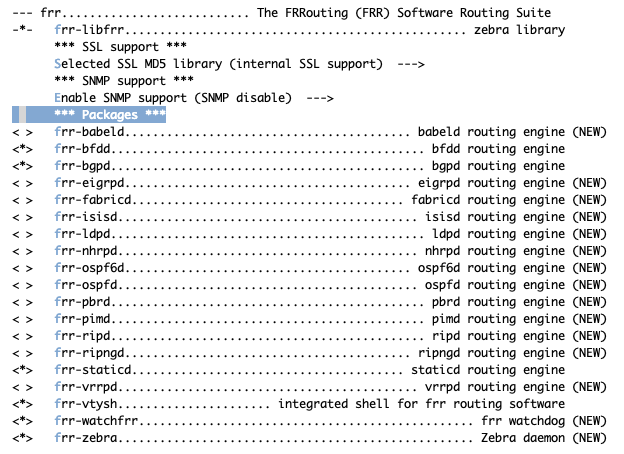
You need the following tools to compile OpenWrt, the package names vary between distributions. A complete list with distribution specific packages is found in the Build System Setup documentation
OS
Ubuntu >= 18.04 (16.04 python3 is 3.5, need > python 3.6)
enable ip-bridge ## MUST vxlan forwording plane will use this tool enable ip-full ## MUST create vxlan interface will use this tool enable ss enable tc-full
add vxlan
1
Network --->
1
enable vxlan ## MUST vxlan forwording plane will use this script
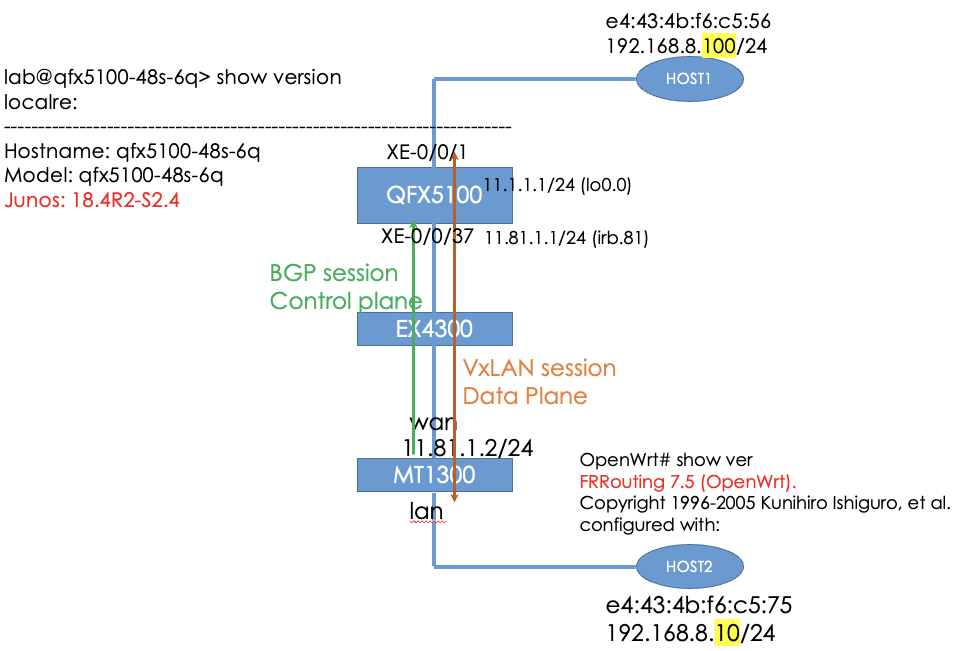
# L2 interface set xe-0/0/0 unit 0 family ethernet-switching interface-mode access set xe-0/0/0 unit 0 family ethernet-switching vlan members vlan-vxlan10
# connect L2 switch set xe-0/0/37 unit 0 family ethernet-switching interface-mode trunk set xe-0/0/37 unit 0 family ethernet-switching vlan members vlan81
# vtep source interface set irb unit 81 family inet address 11.81.1.1/24 set lo0 unit 0 family inet address 11.1.1.1/32
vlan-vxlan10 is vxlan vlan
2.1.2 protocol config
1 2 3 4 5 6 7 8 9 10 11
set routing-options router-id 11.1.1.1 set routing-options autonomous-system 65000 set protocols bgp group evpn type internal set protocols bgp group evpn local-address 11.1.1.1 set protocols bgp group evpn family evpn signaling set protocols bgp group evpn allow 11.81.1.0/24 set protocols bgp group evpn allow 11.82.1.0/24 set protocols evpn encapsulation vxlan set protocols evpn vni-options vni 10 vrf-target target:65000:10 set protocols evpn extended-vni-list 10
2.1.3 switch and vlan config
1
2
3
4
5
6
7
8
9
set switch-options vtep-source-interface lo0.0 set switch-options route-distinguisher 11.1.1.1:10 set switch-options vrf-target target:65000:10 set vlans vlan-vxlan10 vlan-id 10 set vlans vlan-vxlan10 vxlan vni 10 set vlans vlan-vxlan10 vxlan ingress-node-replication set vlans vlan81 description "openwrt test" set vlans vlan81 vlan-id 81 set vlans vlan81 l3-interface irb.81
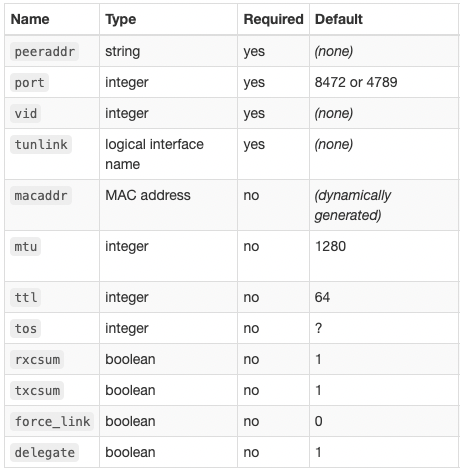
ip link del vxlan1 ip link add vxlan1 type vxlan id 10 local${WAN_IP} dstport 4789 ip link set vxlan1 master br-lan ip link set vxlan1 up
}
2.2.3 firewall config
The OpenWRT default firewall is disable the VxLAN traffic. so we need add the firewall rule. JUNOS will use 4789 to connect the VxLAN.
1 2 3 4 5 6 7
# … in the /etc/config/firewall config rule option name Allow-VxLAN option src wan option dest_port 4789 option proto udp option target ACCEPT
if we need another BGP speaker to connect active. we need to add the BGP 179(TCP) port in the firewall rule. In my use case, the JUNOS BGP speaker is passive mode.
1 2 3 4 5 6 7 8
# … in the /etc/config/firewall config rule option name Allow-BGP option src wan option dest_port 179 option proto tcp option target ACCEPT
3. vxlan evpn status
3.1 QFX5100
3.1.1 BGP (control plane)
BGP peer is evpn.
1 2 3 4 5 6 7 8 9 10 11 12
lab@qfx5100-48s-6q> show bgp summary Threading mode: BGP I/O Groups: 1 Peers: 1 Down peers: 0 Unconfigured peers: 1 Table Tot Paths Act Paths Suppressed History Damp State Pending bgp.evpn.0 2 2 0 0 0 0 Peer AS InPkt OutPkt OutQ Flaps Last Up/Dwn State|#Active/Received/Accepted/Damped... 11.81.1.2 65000 80 70 0 0 28:40 Establ __default_evpn__.evpn.0: 0/0/0/0 bgp.evpn.0: 2/2/2/0 default-switch.evpn.0: 2/2/2/0
bgp.evpn.0: 6 destinations, 6 routes (6 active, 0 holddown, 0 hidden) + = Active Route, - = Last Active, * = Both
2:11.1.1.1:10::10::e4:43:4b:f6:c5:56/304 MAC/IP *[EVPN/170] 00:39:07 Indirect 2:11.81.1.2:2::0::e4:43:4b:f6:c5:75/304 MAC/IP *[BGP/170] 00:45:24, localpref 100 AS path: I, validation-state: unverified > to 11.81.1.2 via irb.81 2:11.1.1.1:10::10::e4:43:4b:f6:c5:56::192.168.8.100/304 MAC/IP *[EVPN/170] 00:19:13 Indirect 2:11.81.1.2:2::0::e4:43:4b:f6:c5:75::192.168.8.10/304 MAC/IP *[BGP/170] 00:00:19, localpref 100 AS path: I, validation-state: unverified > to 11.81.1.2 via irb.81 3:11.1.1.1:10::10::11.1.1.1/248 IM *[EVPN/170] 00:46:26 Indirect 3:11.81.1.2:2::0::11.81.1.2/248 IM *[BGP/170] 00:45:24, localpref 100 AS path: I, validation-state: unverified > to 11.81.1.2 via irb.81
lab@qfx5100-48s-6q> show route table bgp.evpn.0 extensive evpn-mac-address e4:43:4b:f6:c5:75
bgp.evpn.0: 5 destinations, 5 routes (5 active, 0 holddown, 0 hidden) 2:11.81.1.2:2::0::e4:43:4b:f6:c5:75/304 MAC/IP (1 entry, 0 announced) *BGP Preference: 170/-101 Route Distinguisher: 11.81.1.2:2 Next hop type: Indirect, Next hop index: 0 Address: 0xccd60b0 Next-hop reference count: 4 Source: 11.81.1.2 Protocol next hop: 11.81.1.2 Indirect next hop: 0x2 no-forward INH Session ID: 0x0 State: <Active Int Ext> Local AS: 65000 Peer AS: 65000 Age: 17:50:15 Metric2: 0 Validation State: unverified Task: BGP_65000.11.81.1.2+43211 AS path: I Communities: target:65000:10 encapsulation:vxlan(0x8) Import Accepted Route Label: 10 ESI: 00:00:00:00:00:00:00:00:00:00 Localpref: 100 Router ID: 11.81.1.2 Secondary Tables: default-switch.evpn.0 Indirect next hops: 1 Protocol next hop: 11.81.1.2 Indirect next hop: 0x2 no-forward INH Session ID: 0x0 Indirect path forwarding next hops: 1 Next hop type: Router Next hop: 11.81.1.2 via irb.81 Session Id: 0x0 11.81.1.0/24 Originating RIB: inet.0 Node path count: 1 Forwarding nexthops: 1 Next hop type: Interface Nexthop: via irb.81
3.1.2 forwarding plane
mac-ip table
1 2 3 4 5 6 7 8 9 10 11 12 13
{master:0} lab@qfx5100-48s-6q> show ethernet-switching mac-ip-table
MAC IP flags (S - Static, D - Dynamic, L - Local , R - Remote, Lp - Local Proxy, Rp - Remote Proxy, K - Kernel, RT - Dest Route, AD - Advt to remote, RE - Re-ARP/ND, RO - Router, OV - Override) Routing instance : default-switch Bridging domain : vlan-vxlan10 IP MAC Flags Logical Active address address Interface source 192.168.8.100 e4:43:4b:f6:c5:56 DL,K,AD xe-0/0/0.0 192.168.8.10 e4:43:4b:f6:c5:75 DR,K vtep.32769 11.81.1.2
MAC table:
1 2 3 4 5 6 7 8 9 10 11 12 13 14 15 16
{master:0} lab@qfx5100-48s-6q> show ethernet-switching table
MAC flags (S - static MAC, D - dynamic MAC, L - locally learned, P - Persistent static SE - statistics enabled, NM - non configured MAC, R - remote PE MAC, O - ovsdb MAC)
Ethernet switching table : 3 entries, 3 learned Routing instance : default-switch Vlan MAC MAC Logical Active name address flags interface source vlan-vxlan10 e4:43:4b:f6:c5:56 D xe-0/0/0.0 vlan-vxlan10 e4:43:4b:f6:c5:75 D vtep.32769 11.81.1.2 vlan81 94:83:c4:16:51:44 D xe-0/0/37.0
# frr command OpenWrt# show bgp l2vpn evpn summ BGP router identifier 11.81.1.2, local AS number 65000 vrf-id 0 BGP table version 0 RIB entries 3, using 384 bytes of memory Peers 1, using 10896 bytes of memory Peer groups 1, using 32 bytes of memory
# frr command OpenWrt# show bgp l2vpn evpn BGP table version is 15, local router ID is 11.81.1.2 Status codes: s suppressed, d damped, h history, * valid, > best, i - internal Origin codes: i - IGP, e - EGP, ? - incomplete EVPN type-1 prefix: [1]:[ESI]:[EthTag]:[IPlen]:[VTEP-IP] EVPN type-2 prefix: [2]:[EthTag]:[MAClen]:[MAC]:[IPlen]:[IP] EVPN type-3 prefix: [3]:[EthTag]:[IPlen]:[OrigIP] EVPN type-4 prefix: [4]:[ESI]:[IPlen]:[OrigIP] EVPN type-5 prefix: [5]:[EthTag]:[IPlen]:[IP]
Network Next Hop Metric LocPrf Weight Path Route Distinguisher: 11.1.1.1:10 *>i[2]:[10]:[48]:[e4:43:4b:f6:c5:56] 11.1.1.1 100 0 i RT:65000:10 ET:8 *>i[2]:[10]:[48]:[e4:43:4b:f6:c5:56]:[32]:[192.168.8.100] 11.1.1.1 100 0 i RT:65000:10 ET:8 *>i[3]:[10]:[32]:[11.1.1.1] 11.1.1.1 100 0 i RT:65000:10 ET:8 Route Distinguisher: 11.81.1.2:2 *> [2]:[0]:[48]:[e4:43:4b:f6:c5:75] 11.81.1.2 32768 i ET:8 RT:65000:10 *> [2]:[0]:[48]:[e4:43:4b:f6:c5:75]:[32]:[192.168.8.10] 11.81.1.2 32768 i ET:8 RT:65000:10 *> [3]:[0]:[32]:[11.81.1.2] 11.81.1.2 32768 i ET:8 RT:65000:10
Displayed 6 out of 6 total prefixes
evpn BGP advertised-routes
1 2 3 4 5 6 7 8 9 10 11 12 13 14 15 16 17 18
# frr command OpenWrt# show bgp l2vpn evpn neighbors 11.1.1.1 advertised-routes BGP table version is 0, local router ID is 11.81.1.2 Default local pref 100, local AS 65000 Status codes: s suppressed, d damped, h history, * valid, > best, i - internal Origin codes: i - IGP, e - EGP, ? - incomplete
Network Next Hop Metric LocPrf Weight Path Route Distinguisher: 11.81.1.2:2 *> [2]:[0]:[48]:[e4:43:4b:f6:c5:75] 100 32768 i *> [2]:[0]:[48]:[e4:43:4b:f6:c5:75]:[32]:[192.168.8.10] 100 32768 i *> [3]:[0]:[32]:[11.81.1.2] 100 32768 i
Total number of prefixes 3
3.2.2 Linux forwarding plane
bridge fdb
1 2 3 4 5 6 7 8 9 10 11 12 13 14 15 16 17
# linux command root@OpenWrt:~# bridge fdb | grep -E 'vxlan|wan|lan1' e4:43:4b:f6:c5:75 dev lan1 master br-lan 94:83:c4:16:51:45 dev lan1 vlan 1 master br-lan permanent 94:83:c4:16:51:45 dev lan1 master br-lan permanent e4:43:4b:f6:c5:75 dev lan1 vlan 1 self c0:42:d0:08:9a:80 dev wan vlan 1 self 1c:9c:8c:67:c3:44 dev wan vlan 1 self 1c:9c:8c:68:e4:c0 dev wan vlan 1 self e4:43:4b:f6:c5:56 dev vxlan1 vlan 1 extern_learn master br-lan e4:43:4b:f6:c5:56 dev vxlan1 extern_learn master br-lan 3e:dd:f3:a4:65:2b dev vxlan1 vlan 1 master br-lan permanent 3e:dd:f3:a4:65:2b dev vxlan1 master br-lan permanent 00:00:00:00:00:00 dev vxlan1 dst 11.1.1.1 self permanent e4:43:4b:f6:c5:56 dev vxlan1 dst 11.1.1.1 self extern_learn 33:33:00:00:00:01 dev wlan1 self permanent 33:33:00:00:00:02 dev wlan1 self permanent
00:00:00:00:00:00 dev vxlan1 dst 11.1.1.1 self permanent. is add by /lib/netifd/proto/vxlan.sh
vxlan interface:
1 2 3 4 5
root@OpenWrt:~# ip -d link show vxlan1 8: vxlan1: <BROADCAST,MULTICAST,UP,LOWER_UP> mtu 1500 qdisc noqueue master br-lan state UNKNOWN mode DEFAULT group default qlen 1000 link/ether 3e:dd:f3:a4:65:2b brd ff:ff:ff:ff:ff:ff promiscuity 1 minmtu 68 maxmtu 65535 vxlan id 10 local 11.81.1.2 srcport 0 0 dstport 4789 ttl auto ageing 300 udpcsum noudp6zerocsumtx noudp6zerocsumrx bridge_slave state forwarding priority 32 cost 100 hairpin off guard off root_block off fastleave off learning on flood on port_id 0x8003 port_no 0x3 designated_port 32771 designated_cost 0 designated_bridge 7fff.94:83:C4:16:51:45 designated_root 7fff.94:83:C4:16:51:45 hold_timer 0.00 message_age_timer 0.00 forward_delay_timer 0.00 topology_change_ack 0 config_pending 0 proxy_arp off proxy_arp_wifi off mcast_router 1 mcast_fast_leave off mcast_flood on mcast_to_unicast off neigh_suppress off group_fwd_mask 0 group_fwd_mask_str 0x0 vlan_tunnel off isolated off addrgenmode eui64 numtxqueues 1 numrxqueues 1 gso_max_size 65536 gso_max_segs 65535
linux bridge:
1 2 3 4 5
root@OpenWrt:~# brctl show bridge name bridge id STP enabled interfaces br-lan 7fff.9483c4165145 no lan2 vxlan1 lan1
guestfish --rw -a ./ubuntu-20.04-server-cloudimg-amd64.img Welcome to guestfish, the guest filesystem shell for editing virtual machine filesystems and disk images.
Type: ‘help’ forhelp on commands ‘man’ to read the manual ‘quit’ to quit the shell
><fs> ><fs> run ><fs> list-filesystems ><fs> mount /dev/sda1 / ><fs> cat /etc/shadow ><fs> quit
virt-customize --help virt-customize: customize a virtual machine
virt-customize [--options] -d domname
virt-customize [--options] -a disk.img [-a disk.img ...]
A short summary of the options is given below. For detailed help please read the man page virt-customize(1).
Options: -a, --add <file> Add disk image file --append-line <FILE:LINE> Append line(s) to the file --attach <iso> Attach data disk/ISO during install --attach-format <format> Set attach disk format -c, --connect <uri> Set libvirt URI --chmod <PERMISSIONS:FILE> Change the permissions of a file --color, --colors, --colour, --colours Use ANSI colour sequences even if not tty --commands-from-file <FILENAME> Read customize commands from file --copy <SOURCE:DEST> Copy files in disk image --copy-in <LOCALPATH:REMOTEDIR> Copy local files or directories into image -d, --domain <domain> Set libvirt guest name --delete <PATH> Delete a file or directory -n, --dryrun, --dry-run Perform a dry run --echo-keys Don’t turn off echofor passphrases --edit <FILE:EXPR> Edit file using Perl expression --firstboot <SCRIPT> Run script at first guest boot --firstboot-command <'CMD+ARGS'> Run command at first guest boot --firstboot-install <PKG,PKG..> Add package(s) to install at first boot --format <format> Set format (default: auto) --help Display brief help --hostname <HOSTNAME> Set the hostname --install <PKG,PKG..> Add package(s) to install --key <SELECTOR> Specify a LUKS key --keys-from-stdin Read passphrases from stdin --link <TARGET:LINK[:LINK..]> Create symbolic links -m, --memsize <mb> Set memory size --mkdir <DIR> Create a directory --move <SOURCE:DEST> Move files in disk image --network Enable appliance network (default) --no-logfile Scrub build log file --no-network Disable appliance network --password <USER:SELECTOR> Set user password --password-crypto <md5|sha256|sha512> Set password crypto -q, --quiet Don’t print progress messages --root-password <SELECTOR> Set root password --run <SCRIPT> Run script in disk image --run-command <'CMD+ARGS'> Run commandin disk image --scrub <FILE> Scrub a file --selinux-relabel Relabel files with correct SELinux labels --sm-attach <SELECTOR> Attach to a subscription-manager pool --sm-credentials <SELECTOR> Credentials for subscription-manager --sm-register Register using subscription-manager --sm-remove Remove all the subscriptions --sm-unregister Unregister using subscription-manager --smp <vcpus> Set number of vCPUs --ssh-inject <USER[:SELECTOR]> Inject a public key into the guest --timezone <TIMEZONE> Set the default timezone --touch <FILE> Run touch on a file --truncate <FILE> Truncate a file to zero size --truncate-recursive <PATH> Recursively truncate all files in directory --uninstall <PKG,PKG..> Uninstall package(s) --update Update packages --upload <FILE:DEST> Upload local file to destination -V, --version Display version and exit -v, --verbose Enable libguestfs debugging messages --write <FILE:CONTENT> Write file -x Enable tracing of libguestfs calls
1 设置root密码
1 2
virt-customize -a ubuntu-20.04-server-cloudimg-amd64.img \ --root-password password:lab123
output:
1 2 3 4 5 6 7
[ 0.0] Examining the guest ... [ 4.3] Setting a random seed virt-customize: warning: random seed could not be setfor this type of guest [ 4.4] Setting the machine ID in /etc/machine-id [ 4.4] Setting passwords [ 5.8] Finishing off
2 在Image中安装软件包
1 2
virt-customize -a ubuntu-20.04-server-cloudimg-amd64.img \ --install net-tools,unzip
output:
1 2 3 4 5 6
[ 0.0] Examining the guest ... [ 2.2] Setting a random seed virt-customize: warning: random seed could not be setfor this type of guest [ 2.3] Installing packages: net-tools unzip [ 9.2] Finishing off
3 copy 文件到镜像中
1 2
virt-customize -a ubuntu-20.04-server-cloudimg-amd64.img \ --upload ../http_test:/http_test
output:
1 2 3 4 5 6
[ 0.0] Examining the guest ... [ 2.2] Setting a random seed virt-customize: warning: random seed could not be setfor this type of guest [ 2.2] Uploading: ../http_test to /http_test [ 2.3] Finishing off
4 修改时区
1 2 3
virt-customize -a ubuntu-20.04-server-cloudimg-amd64.img \ --timezone "Asia/Shanghai"
5 上传SSH公钥
1 2
virt-customize -a ubuntu-20.04-server-cloudimg-amd64.img \ --ssh-inject lab:file:./id_rsa.pub
6 在文件中添加内容
1 2
virt-customize -a ubuntu-20.04-server-cloudimg-amd64.img \ --append-line '/etc/hosts:10.0.0.1 foo'
7 create a user in image
1 2 3 4 5 6
virt-customize -a ubuntu-20.04-server-cloudimg-amd64.img \ --run-command 'useradd test -s /bin/bash -m'
virt-customize -a ubuntu-20.04-server-cloudimg-amd64.img \ --password test:password:lab123
output:
1 2 3 4 5 6 7 8 9 10 11 12 13 14
[ 0.0] Examining the guest ... [ 2.2] Setting a random seed virt-customize: warning: random seed could not be setfor this type of guest [ 2.3] Running: useradd test -s /bin/bash -m [ 2.4] Finishing off
[ 0.0] Examining the guest ... [ 2.2] Setting a random seed virt-customize: warning: random seed could not be setfor this type of guest [ 2.3] Setting passwords [ 3.6] Finishing off
systemctl status rshim ● rshim.service - rshim driver for BlueField SoC Loaded: loaded (/lib/systemd/system/rshim.service; enabled; vendor preset: enabled) Active: active (running) since Fri 2021-12-17 07:01:48 UTC; 14min ago Docs: man:rshim(8) Process: 10663 ExecStart=/usr/sbin/rshim $OPTIONS (code=exited, status=0/SUCCESS) Main PID: 10666 (rshim) Tasks: 6 (limit: 629145) Memory: 2.2M CGroup: /system.slice/rshim.service └─10666 /usr/sbin/rshim
Dec 17 07:01:48 ubuntu2004-lab1 systemd[1]: Starting rshim driver for BlueField SoC... Dec 17 07:01:48 ubuntu2004-lab1 systemd[1]: Started rshim driver for BlueField SoC. Dec 17 07:01:48 ubuntu2004-lab1 rshim[10666]: Probing pcie-0000:3b:00.2 Dec 17 07:01:48 ubuntu2004-lab1 rshim[10666]: create rshim pcie-0000:3b:00.2 Dec 17 07:01:49 ubuntu2004-lab1 rshim[10666]: rshim0 attached Dec 17 07:08:03 ubuntu2004-lab1 rshim[10666]: rshim0 boot open Dec 17 07:08:13 ubuntu2004-lab1 rshim[10666]: rshim0 boot close
2.1 check rshim
1 2 3 4 5 6 7
# ls -lh /dev/rshim0/ total 0 crw------- 1 root root 235, 0 Dec 17 07:01 boot crw------- 1 root root 234, 0 Dec 17 07:01 console crw------- 1 root root 511, 0 Dec 17 07:01 misc crw------- 1 root root 236, 0 Dec 17 07:01 rshim
1 2 3 4 5 6 7
Dec 17 07:01:48 ubuntu2004-lab1 rshim[10666]: Probing pcie-0000:3b:00.2 Dec 17 07:01:48 ubuntu2004-lab1 rshim[10666]: create rshim pcie-0000:3b:00.2 Dec 17 07:01:49 ubuntu2004-lab1 rshim[10666]: rshim0 attached Dec 17 07:08:03 ubuntu2004-lab1 rshim[10666]: rshim0 boot open Dec 17 07:08:13 ubuntu2004-lab1 rshim[10666]: rshim0 boot close
pcie-0000:3b:00.2 --> rshim0
3 install bfb to bluefield NIC
3.1 create login password
The password is lab123
1
echo"ubuntu_PASSWORD='$(openssl passwd -1 lab123)'" | tee bf.cfg
write counter to semaphore: Operation not permitted write counter to semaphore: Operation not permitted write counter to semaphore: Operation not permitted write counter to semaphore: Operation not permitted write counter to semaphore: Operation not permitted write counter to semaphore: Operation not permitted INFO: Changing the default password for user ubuntu Boot0000* focal INFO: Installation finished INFO: Rebooting...
Mellanox BlueField-2 A1 BL1 V1.1 NOTICE: BL2R: v2.2(release):3.8.0-25-ge146e67 NOTICE: BL2R: Built : 15:12:50, Nov 30 2021 NOTICE: BL2R built for hw (ver 1) NOTICE: BL2R: Booting BL2 NOTICE: BL2: v2.2(release):3.8.0-25-ge146e67 NOTICE: BL2: Built : 15:12:50, Nov 30 2021 NOTICE: BL2 built for hw (ver 1) NOTICE: Running as MBF2H332A-AECO system NOTICE: No SPD detected on MSS0 DIMM0 NOTICE: No SPD detected on MSS0 DIMM1 NOTICE: Finished initializing DDR NOTICE: DDR POST passed. NOTICE: BL31: v2.2(release):3.8.0-25-ge146e67 NOTICE: BL31: Built : 15:12:50, Nov 30 2021 NOTICE: BL31 built for hw (ver 1) UEFI firmware (version BlueField:3.8.0-34-gb1e3ae0 built at 15:15:10 on Nov 30 2021) Press <ESC> twice to enter UEFI menu 3 seconds remaining 2 seconds remaining 1 seconds remaining 0 [ 0.608703] rtc-efi rtc-efi: hctosys: unable to read the hardware clock [ 10.715782] mlx5_core 0000:03:00.0: mlx5_devlink_eswitch_lag_port_select_mode_set:4632:(pid 887): hash based LAG is not supported by current device [ 12.861453] mlx5_core 0000:03:00.1: mlx5_devlink_eswitch_lag_port_select_mode_set:4632:(pid 887): hash based LAG is not supported by current device
Ubuntu 20.04.3 LTS localhost hvc0
localhost login:
The login username is ubuntu. The password is lab123
5 connect bluefield use by ssh
5.1 config tmfifo_net0
1
ip add add 192.168.100.1/30 dev tmfifo_net0
check interface
1
2
3
4
5
6
7
8
9
10
11
root@ubuntu2004-lab1:~# ip address show tmfifo_net0
16: tmfifo_net0: <BROADCAST,MULTICAST,UP,LOWER_UP> mtu 1500 qdisc fq_codel state UNKNOWN group default qlen 1000
    link/ether 00:1a:ca:ff:ff:02 brd ff:ff:ff:ff:ff:ff
    inet 192.168.100.1/30 scope global tmfifo_net0
       valid_lft forever preferred_lft forever
    inet6 fe80::21a:caff:feff:ff02/64 scope link
       valid_lft forever preferred_lft forever

root@ubuntu2004-lab1:~# ping 192.168.100.2
PING 192.168.100.2 (192.168.100.2) 56(84) bytes of data.
64 bytes from 192.168.100.2: icmp_seq=1 ttl=64 time=2.46 ms
root@ubuntu2004-lab1:~# ssh -l ubuntu 192.168.100.2 The authenticity of host '192.168.100.2 (192.168.100.2)' can't be established. ECDSA key fingerprint is SHA256:QqO4i9YSGBI6pp1N8JJKqnTFokEEn1JVh+sdxcYPIb4. Are you sure you want to continue connecting (yes/no/[fingerprint])? yes Warning: Permanently added '192.168.100.2' (ECDSA) to the list of known hosts. ubuntu@192.168.100.2's password: Welcome to Ubuntu 20.04.3 LTS (GNU/Linux 5.4.0-1022-bluefield aarch64)